
The Roll Number Slips Class 8 Annual Examination 2026 download process has officially started for all concerned schools and examination clusters. According to the latest notification issued on 1 March 2026, institutions can now download computerized roll number slips through the official examination management portal.
This article includes complete details from the official notice along with step-by-step guidance so schools and teachers can complete the process without errors.
📢 Official Notification Details (1 March 2026)
According to the official update:
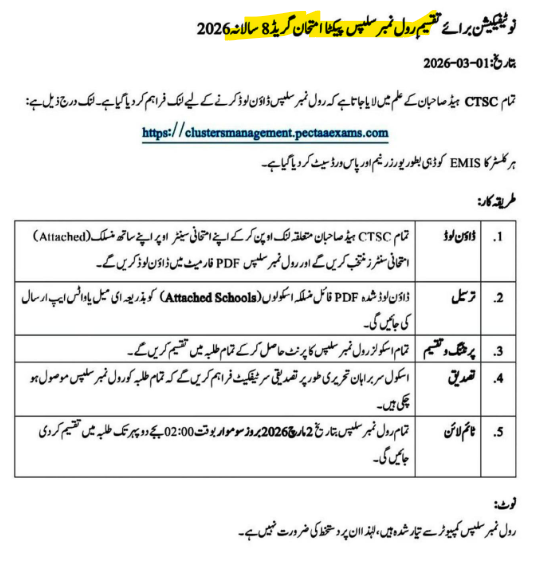
- Roll number slips for 8th Class Annual Exams 2026 have been uploaded online.
- All CTSC clusters must download slips of their attached schools.
- The portal provided for downloading is: https://clustersmanagement.pectaexams.com
- EMIS cluster logins are already activated for access.
- Slips are fully computerized.
- No manual signature is required.
⏰ Final Deadline: 2 March 2026 (2:00 PM)
All institutions must complete the process before the closing time.
Who Can Download the Roll Number Slips?
The notification clearly states:
- All CTSC clusters
- Examination centers
- Authorized school administration
- EMIS registered institutions
Students cannot directly download slips unless allowed by their school.
Step-by-Step Process to Download Roll Number Slips Class 8 Annual 2026
Follow these instructions carefully.
Step 1: Login to the Official Portal
Visit:
👉 https://clustersmanagement.pectaexams.com
Use your EMIS cluster login credentials to access the system.
Make sure:
- Internet connection is stable
- Correct username and password are entered
Step 2: Open Attached Schools Section
After login:
- Click on your cluster dashboard.
- Open the Attached Schools section.
- Download the PDF file containing the list of linked schools.
This step ensures you download slips for the correct institutions.
Step 3: Download Roll Number Slips PDF
Once schools are verified:
- Click on “Roll Number Slips – Class 8 Annual 2026”
- Download the PDF file
All student roll numbers will be listed there.
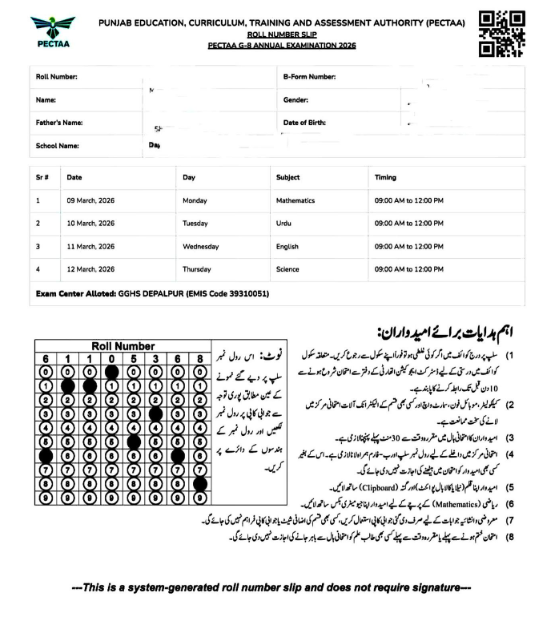
Step 4: Print the Slips
After downloading:
✔ Print slips clearly on A4 paper
✔ Ensure student information is readable
✔ Avoid low-quality printing
Step 5: Verify Student Data
Before distribution, verify:
- Student name spelling
- Father’s name
- School name
- Subjects
- Examination center
Read More: Date Sheet Grade 8 Annual Examination 2026 Multan Punjab
⚠ Important: Schools are responsible for verifying accuracy before distributing to students.
Official Instructions Mentioned in Notification
Here is a simplified breakdown of the 5 main instructions mentioned:
1️⃣ CTSC Clusters Responsibility
Each CTSC cluster must log in and download roll number slips of its attached schools.
2️⃣ Download Attached Schools List
A PDF file of attached schools must be downloaded and verified.
3️⃣ Print and Complete Process
All roll number slips must be downloaded and processed completely.
4️⃣ Data Verification
Schools must confirm all data is correct before issuing slips.
5️⃣ Deadline Compliance
All slips must be downloaded by:
🕑 2 March 2026, before 2:00 PM
Late access may not be possible.
Important Note from the Notification
The notice clearly states:
Roll number slips are computerized; therefore, no signature is required.
This means:
- Do NOT sign manually.
- Do NOT stamp unnecessarily.
- The system-generated slip is valid as it is.
Common Problems & Quick Solutions
❌ Portal Not Opening
Solution:
- Try accessing early morning.
- Use updated browser.
- Clear cache.
❌ Wrong Student Details
Solution:
- Contact your district coordinator immediately.
- Do not edit manually.
- Provide EMIS code and student information.
❌ Forgot Login Credentials
Solution:
- Contact EMIS support.
- Do not attempt multiple wrong logins.
Quick Checklist for Schools
Before the deadline, confirm:
- Logged into official portal
- Downloaded attached schools list
- Downloaded roll number slips
- Verified all student data
- Printed and distributed
- Completed before 2 March 2026 (2 PM)
Why You Should Not Delay
Waiting until the last hour can cause:
- Server overload
- Login errors
- Incomplete downloads
- Printing delays
Early completion ensures smooth examination management.
Tips for Students
If you are a student:
- Ask your school for your slip immediately.
- Check your roll number carefully.
- Confirm your examination center location.
- Keep extra photocopies.
Your roll number slip is required for exam entry.
FAQs – Roll Number Slips Class 8 Annual Examination 2026
Q1: What is the last date to download roll number slips?
2 March 2026, before 2:00 PM.
Q2: Is a signature required on the slip?
No. Slips are computerized and do not require signatures.
Q3: Can students download slips themselves?
Usually, only schools or clusters can download them through the official portal.
Q4: What should I do if my name is incorrect?
Immediately inform your school administration before exams begin.
Q5: Which portal is used for download?
The official portal mentioned in the notification:
https://clustersmanagement.pectaexams.com
Final Words
The Roll Number Slips Class 8 Annual Examination 2026 download process is simple but time-sensitive. Schools must act responsibly and complete downloading, verification, and distribution before the official deadline.
Following the official instructions ensures smooth exam operations and avoids unnecessary stress.
If your institution has completed the download process, make sure all students receive their slips on time.
Arooj fatima ma ka razatal kab
2026 class 8thesult
Baknanwala
34220499
Roll nuber 70-205-123
The Candidate has Obtained Marks: 180.0 / 400
GRADE D